 Apex Green
: Product Sourcing & UPC Scanner
Every supplier list. Every match. One pass.
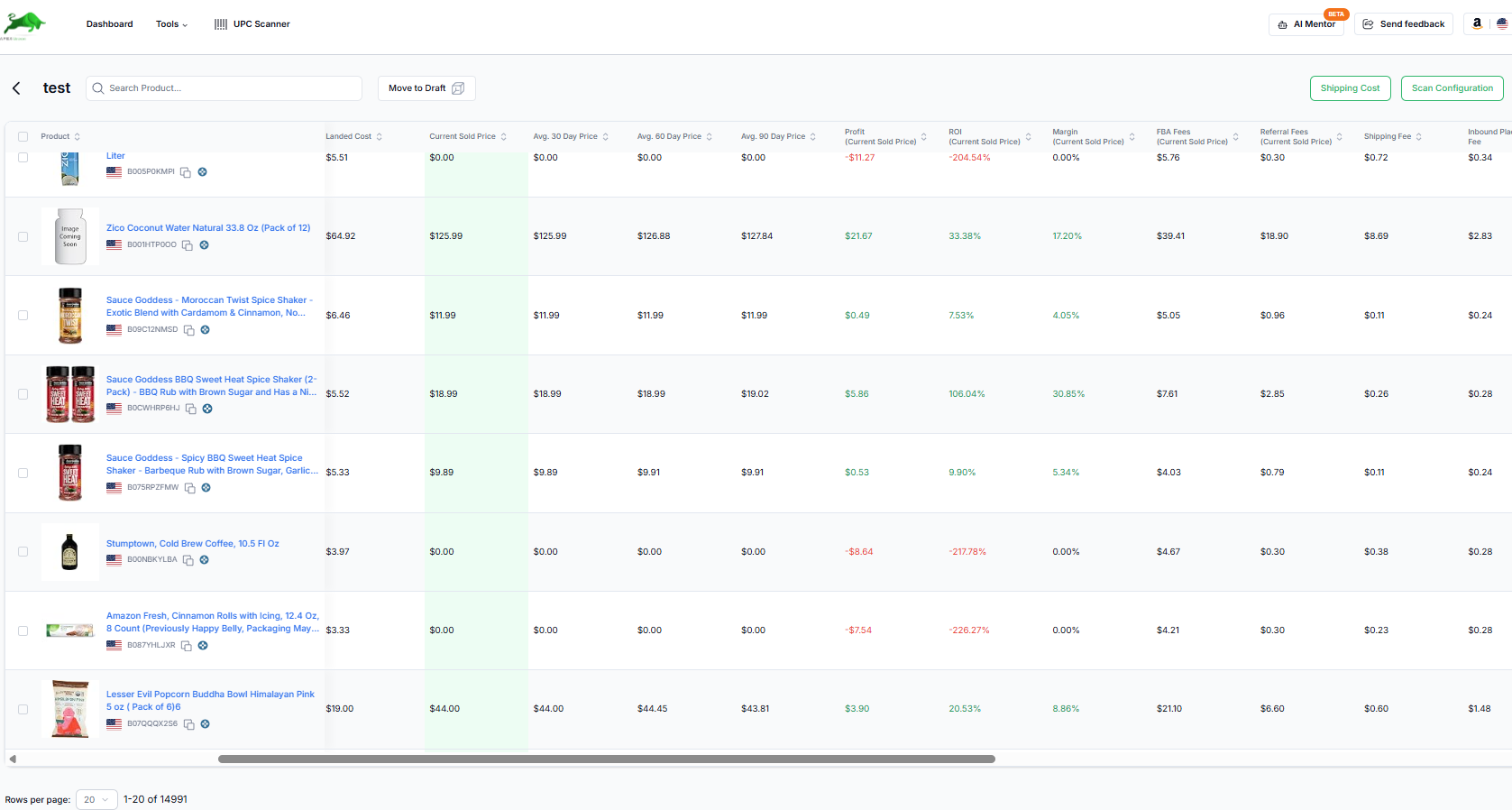
Drop in a supplier's price list. Apex matches every UPC and EAN to Amazon in the background and shows profit, ROI, rank and competition on every line.
7 days free, then $149 a month, plus tax where applicable. Card required, nothing charged until day 8. Cancel any time before then.
Sourcing at catalog scale.
- 98M+
- UPC and EAN identifiers to match your supplier lists against.
- 122M+
- Amazon products in the Apex catalog.
- 300,000
- Supplier lines a month on Starter. Unlimited on Pro.
UPC Scanner
Thousands of lines. Only the winners.
Filter every match by profit, ROI, sales rank, seller count and whether Amazon sells it, and hide what you already carry. Pack sizes and variations can make a match ambiguous, so check case packs before you order.
- Works through the whole file in the background
- Sales rank and estimated sales per listing
- Seller counts and who holds the Buy Box
- Hazmat and meltable flags on every match
Master Catalog
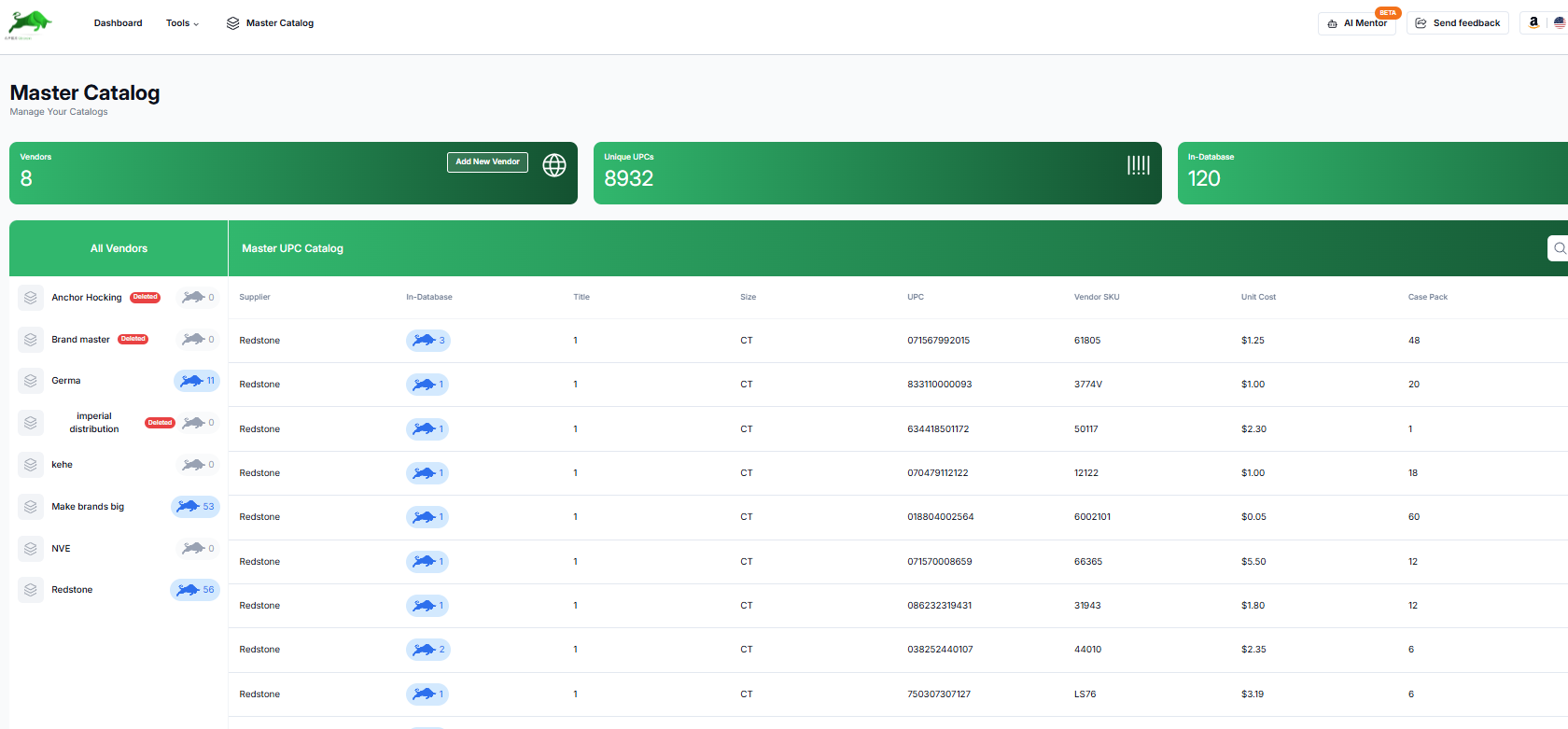
Every supplier. One catalog.
Every price list you scan lands in one Master Catalog, so you can see which supplier has the best price on a product you already sell, and move it straight to your database or a purchase order.
At a glance
Apex Green, in plain terms.
A supplier sends a price list with thousands of lines. Checking each one against Amazon by hand takes days, and most lines are not worth buying.
Who it is for
What you need
- A supplier price list in CSV or Excel with UPC or EAN codes and your cost per unit
- The supplier's name, so the matches are filed under it
What you get
How it works
- Upload the price list and pick the supplier
- Map the UPC and cost columns
- Apex matches each code to Amazon products in the background
- Filter by profit, ROI, sales rank, seller count and whether Amazon sells it, and hide products you already carry
- Add the products you want to your database, or put them straight on a purchase order
Plans
- No limit on the number of scans: plans count products scanned a month
- Beginner: 50,000 products a month
- Starter: 300,000 products a month
- Plus: 500,000 products a month
- Pro: unlimited
- Up to 100,000 products in one file, and scanning the same products again in the same month is free
- 30, 60 and 90 day average prices and ranks are on Pro
Good to know
- Coverage is not the same as freshness. Apex matches against 122M+ Amazon products, but prices, ranks and offers refresh for the products sellers track, so an untracked product can show older figures until it is refreshed.
- Profit uses the cost in your file plus the shipping you set. Check bundles and case packs before you order.
With ChatGPT or Claude
“Which products from my last scan for this supplier clear 30% ROI and are not in my database yet?”
Your assistant reads scans you have already run. It cannot upload a price list.
Your next supplier list is already waiting.
7 days free, then $149 a month, plus tax where applicable. Card required, nothing charged until day 8. Cancel any time before then.
Guides for Apex Green
- Reading Keepa chartsHow to read Keepa's price, sales rank, offer count and Buy Box data before a wholesale buy, with real examples and four patterns to recognize.
- Profit margin and ROIHow to work out profit, ROI and margin for Amazon wholesale, the rules of thumb sellers use and why, and the most you can pay for a target ROI.
- Products to avoidThe listings to walk away from before you buy: Amazon selling, too many sellers, hazmat, expiry and meltables, Transparency, brand complaints, price wars.
- Purchase order workflowHow to run purchase orders for Amazon wholesale from quote to receiving: what goes on a PO, landed cost, invoices, discrepancies and restock orders.
How Apex Green compares
Side-by-side with the tools sellers usually weigh it against, including where they are the better choice.
- Apex vs SmartScoutWholesale research
- Apex vs SellerAmpSourcing research
- Apex vs AMZScoutProduct research suite
- Apex vs Scan UnlimitedBulk catalog scanning
- Apex vs Rocket SourceScanner and identifier tools
- Apex vs Tactical ArbitrageMulti-source product research
- Apex vs Seller AssistantAll-in-one sourcing
- Apex vs Helium 10Private-label suite
- Apex vs Jungle ScoutProduct research